Moving off Jira anyway?
Move somewhere better.
Data Center is being retired and Jira Cloud means a new bill. Bring your projects, comments, sprints and Confluence pages into one workspace with boards, docs, test management and traceability built in. Free for 5 users, then $5 per user.
Every Data Center team has to move
Atlassian is retiring Data Center in stages. If you have to migrate and re-price anyway, it’s the right moment to choose where you land.
No new Data Center sales
New customers can no longer buy Data Center. Existing customers can still renew.
No new purchases or expansions
Existing customers can’t add new Data Center subscriptions or grow existing ones.
Data Center end of life
Jira, Jira Service Management and Confluence Data Center subscriptions expire and become read-only.
Dates from Atlassian’s Data Center end-of-life announcement. Check atlassian.com for the current timeline.
Jira is rarely just Jira
Add docs, test management and time tracking, and the bill is several products. In Kollabry they’re one workspace and one price.
Per user a month, in USD. Jira and Confluence are Atlassian’s Standard list prices for 1–100 users on monthly billing, as of November 2026; per-user prices are lower for larger teams and annual billing. App prices are estimates and vary by vendor and tier. Enter your own quote for an exact figure. Check current prices: Jira pricing ↗ · Confluence pricing ↗
| In a typical Jira setup | In Kollabry |
|---|---|
| Boards, backlog, sprints, roadmap | Boards, backlog, sprints, roadmap |
| Workflows and automation rules | Workflows and Automation Studio |
| Confluence (a separate product) | Synergy docs, whiteboards and knowledge graph, built in |
| Test management app (Xray, Zephyr) | Test cases, runs and the quality gate, built in |
| Time tracking app (Tempo Timesheets) | Timesheet, built in |
| Client billing and cost apps | PSA add-on: rates, budgets, invoicing and profitability ($7 per user) |
| Requirements and traceability apps | Traceability from document to requirement, story, test and release |
| GitHub and CI apps | GitHub, GitLab, CI and webhooks, included in every plan |
Jira and Confluence are trademarks of Atlassian; Kollabry is not affiliated with Atlassian. See the full comparison →
Where is your Jira today?
Jira Cloud connects directly. Data Center and Server import from a CSV export.
Import directly from Jira Cloud
Connect once and bring a whole project across, with its conversation, files and history, not just the issue list.
Create an Atlassian API token
Use an account that can see the project (id.atlassian.com → Security → API tokens). Kollabry stores it encrypted for this import only and deletes it when the import finishes.
Connect from Kollabry
In Settings → Import → Jira, enter your site (yourcompany.atlassian.net), your Atlassian email and the token. A workspace admin does this.
Choose a project and check the mapping
Kollabry reads Jira’s workflow and proposes board columns, issue types and custom fields. Change anything before you go on.
Run the dry run
See how many issues, sprints and attachments will come across, which people match your members by email, and any warnings. Nothing is created yet.
Import
The import runs in the background and can be paused and resumed. It is quiet: no notifications, webhooks or automations fire while it runs.
Keep Jira in sync while you trial
Optionally re-sync every night, so the team can try Kollabry while still working in Jira. Stop the sync whenever you like; the token is deleted.
What comes across
- Issues and descriptions, with types, statuses and priorities
- Board columns built from your Jira workflow
- Epics and parents, and issue links (blocks, duplicates, relates to)
- Comments, with their original author and time
- Attachments up to 100 MB each
- Sprints, fix versions (as releases), labels and components
- Story points, custom fields and logged time (worklogs)
- Change history for status, assignee, priority, sprint, version and parent
- Assignees and reporters, matched to your members by email
What stays in Jira
- Attachments over 100 MB (they stay linked in Jira)
- Jira automation rules and Marketplace app data
Custom fields come across up to the space’s field limit: 5 on the free plan, 50 on Team.
Import from Jira Data Center or Server
Export from Jira as CSV and Kollabry recognises the format, maps the columns and shows a dry run. About 30 minutes for a typical project.
Export your issues from Jira
In Jira, open Filters, search for the project or issues you want to move, and choose Export → CSV (all fields). An Excel export works too.
Create a space in Kollabry
Create a space for the team (or open an existing one). It comes with a board, backlog and sprints ready to use.
Upload the file
Open the space’s Backlog, choose Import and pick your CSV or Excel file. Kollabry recognises the Jira export automatically.
Check the column mapping
Summary, type, status, priority, assignee, epic, sprint, story points, labels and due date are pre-mapped. Map each custom field to an existing field or create it; the type is guessed from your data.
Preview and dry run
See exactly what will be created, which values don’t fit and how many issues are ready, before anything changes.
Import
Issues are created in the space, with epics as initiatives, sprints created by name and labels added. Each import takes up to 2,000 issues; split larger projects by epic or year.
What comes across
- Issues with summary, description, type, status and priority
- Assignees, matched to space members by name or email
- Epics (as initiatives) and sprints, created by name
- Story points, labels and due dates
- Custom fields, mapped or created, with types guessed
What stays in Jira
- Comments, attachments and issue links
- Change history and worklogs
Many teams keep Data Center read-only as the historical record until it reaches end of life. Moving a large instance or need more than the CSV carries? Talk to us and we’ll plan it with you.
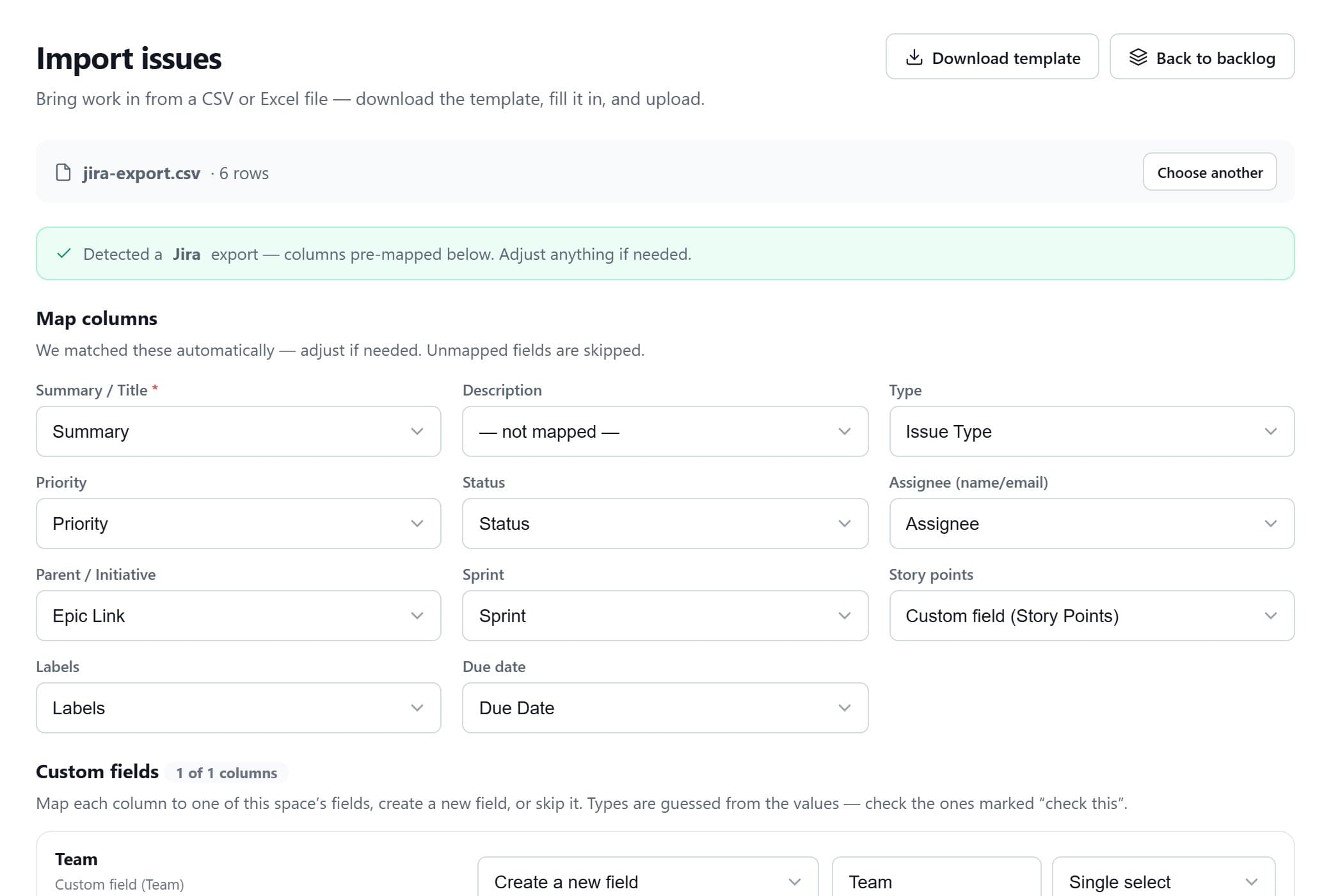
How Jira fields map to Kollabry
Pre-mapped for you. You can change any of it before you import.
| Jira | In Kollabry | Cloud import | CSV import |
|---|---|---|---|
| Summary, Description | Title, description | ✓ yes | ✓ yes |
| Issue Type | Type (story, task, bug, epic, sub-task) | ✓ yes | ✓ yes |
| Status | Status, matched to the board’s columns | ✓ yes | ✓ yes |
| Priority | Priority | ✓ yes | ✓ yes |
| Assignee, Reporter | Assignee and reporter, matched to members | ✓ yes | ✓ yes |
| Epic Link / Parent | Parent or initiative | ✓ yes | ✓ yes |
| Sprint | Sprint (created if it doesn’t exist yet) | ✓ yes | ✓ yes |
| Story Points | Estimate | ✓ yes | ✓ yes |
| Labels, Components | Labels (components as component:name) | ✓ yes | Labels only |
| Custom fields | Custom fields, mapped or created | ✓ yes | ✓ yes |
| Fix Version | Release | ✓ yes | — no |
| Comments | Comments, with original author and time | ✓ yes | — no |
| Attachments | Attachments (up to 100 MB each) | ✓ yes | — no |
| Issue links | Blocks, duplicates, relates to | ✓ yes | — no |
| Worklogs | Logged time | ✓ yes | — no |
| History | Activity, with original time and person | ✓ yes | — no |
How to import Confluence pages into Synergy
Synergy is Kollabry’s docs and knowledge base, included in every workspace and linked both ways to the work.
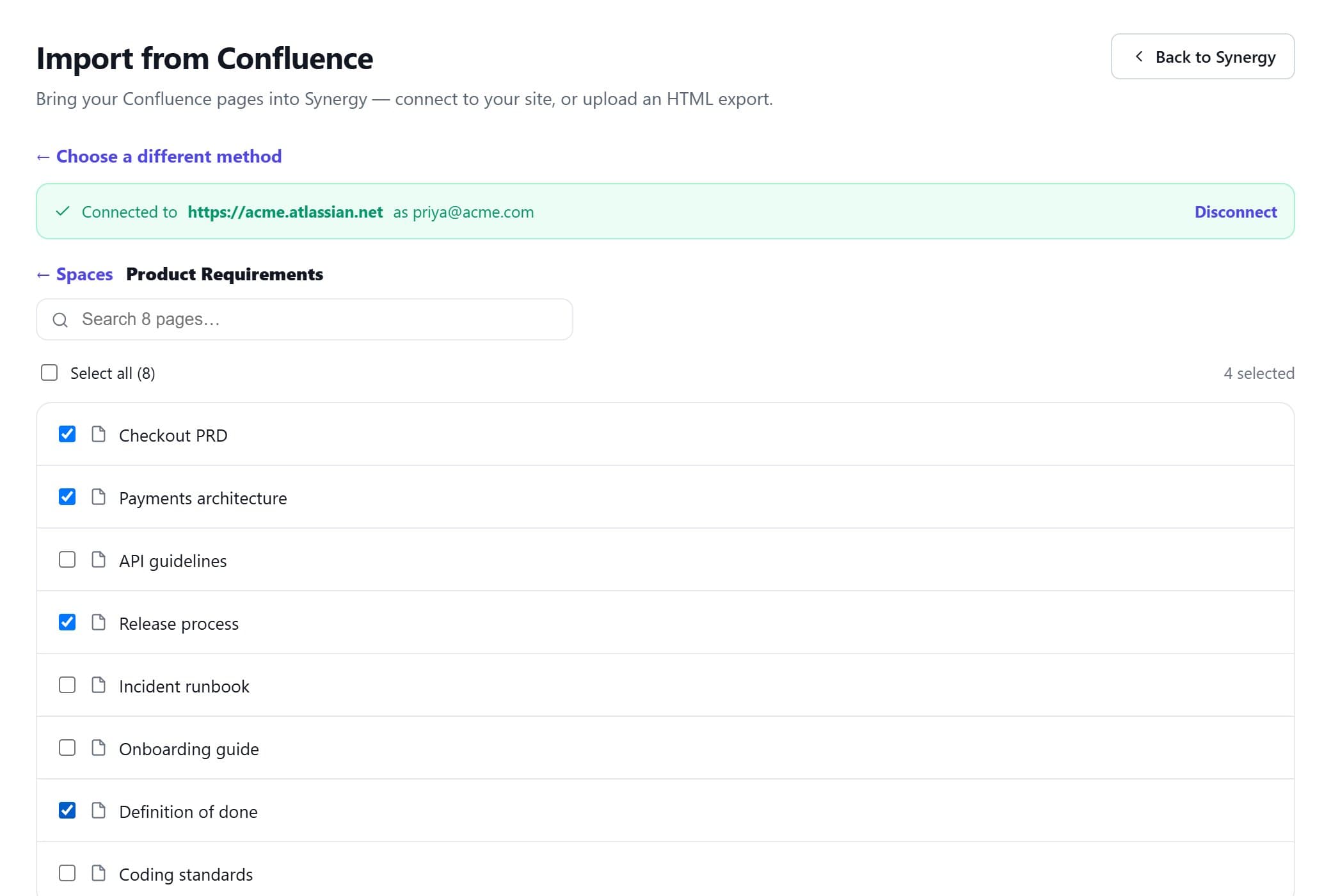
Connect Confluence Cloud
In your Kollabry space, open Synergy → Import from Confluence → Connect to Confluence, and enter your site URL, your Atlassian email and a classic API token (id.atlassian.com → Security → API tokens).
Choose spaces and pages
Browse your Confluence spaces, search pages, and tick exactly what you want to bring across.
Import
Pages become Synergy documents, keeping the page tree (parent and child pages). Images are copied into Kollabry so pages still show them.
On Confluence Server or Data Center?
Export the space as HTML (Space settings → Export space → HTML), then upload the .zip on the same import page. No credentials needed.
A low-risk way to switch
No big-bang cut-over: run both side by side, move one team first, then the rest.
- Pick a pilot team. Choose one team and one project for the first import.
- Import the backlog and docs. Bring the active project’s issues and the Confluence pages the team works from. On Jira Cloud, turn on the nightly sync.
- Connect your tools. Link GitHub, Slack or Microsoft Teams and your CI so status updates itself from real work.
- Run a sprint. Plan and run one sprint in Kollabry while Jira stays available.
- Roll out. Import the next teams the same way, then make Jira read-only as the historical record.
Jira migration FAQ
When does Jira Data Center reach end of life?
Atlassian has announced that Jira, Jira Service Management and Confluence Data Center reach end of life on 28 March 2029, when subscriptions expire and the products become read-only. New Data Center sales stopped on 30 March 2026, and existing customers can’t buy new subscriptions or expansions after 30 March 2028. Check atlassian.com for the current timeline.
Can we import directly from Jira Cloud?
Yes. Connect with an Atlassian API token in Settings → Import → Jira. Kollabry brings across issues, comments, attachments up to 100 MB, sprints, fix versions, labels, links, custom fields, worklogs and change history, after a dry run that shows what will be created.
How do we migrate from Jira Data Center or Server?
Export your issues to CSV from Jira and import them into a Kollabry space. Kollabry recognises the Jira format and maps types, statuses, priorities, epics, sprints, story points, labels and custom fields. Comments, attachments, links, history and worklogs aren’t part of a CSV export, so many teams keep Data Center read-only as the record. For a large instance, contact us and we’ll plan the migration with you.
Can we keep using Jira while we try Kollabry?
Yes. With the Jira Cloud import you can turn on a nightly re-sync, so changes made in Jira keep flowing into Kollabry while the team tries it. Edits made in Kollabry are kept. Stop the sync whenever you like.
How long does it take to migrate from Jira?
For one team, usually an afternoon. Large Jira Cloud projects import in the background, in steps that can be paused and resumed. Most teams start with one team and move others once it’s working.
What does Kollabry cost compared with Jira?
Kollabry is free for up to 5 users, then $5 per user a month for everything: boards and sprints, Synergy docs, test management, traceability, time tracking and an AI allowance. The only add-on is PSA, for teams that bill clients from Timesheet.
Are custom fields imported?
Yes. Each custom field can be mapped to one of the space’s fields or created as a new one, with the type guessed from the values. The free plan allows 5 custom fields per space and Team allows 50.
Can we import Confluence pages?
Yes. Connect Confluence Cloud and pick spaces and pages, or, for Confluence Server and Data Center, upload the space’s HTML export (.zip). Pages become Synergy documents and keep their page tree.
Is Kollabry affiliated with Atlassian?
No. Jira and Confluence are trademarks of Atlassian. This page describes Jira and Confluence as we understand them; menu names and prices can differ between versions and plans.
Bring your first project across today
Free for up to 5 users. Passwordless sign-up, then import from Jira in minutes.
Comparing first? Kollabry vs Jira →